Action Center: turning algorithm signals into one-tap fixes.
PriceLabs’ Pulse algorithm already knew when a listing was missing key settings or underperforming. Hosts didn’t. Action Center turns those signals into recommended actions, each with the one step that resolves it, on desktop and in the app.
Pulse flagged listings with missing settings or weak performance, but those signals stayed inside the algorithm. Hosts found problems late, if at all.
Designed how alerts are prioritised, surfaced in the listings table and the app, and resolved in place, plus the settings to control them.
Setup gaps and underperformance now surface where hosts already work, and most are fixed in one tap instead of a support ticket.
01 · Context
The Pulse pricing algorithm scores every listing on a set of performance metrics. When a listing doesn’t have the recommended settings, or it underperforms its market, Pulse knows. Action Center is where that knowledge becomes a recommended action: a nudge that names the problem, explains the cost and offers the fix.
02 · From signal to action
Every alert follows one path: Pulse metrics, a rule, a severity, a one-tap fix.
Every alert follows the same path, so hosts learn one pattern instead of many.
Missing base price, bedroom count or location. These block recommendations, so they’re always on.
Patterns that hurt revenue, like many blocked or unbookable dates in the next 90 days.
Better settings Pulse can suggest, such as a new base price or a lower minimum price.
03 · Prototype
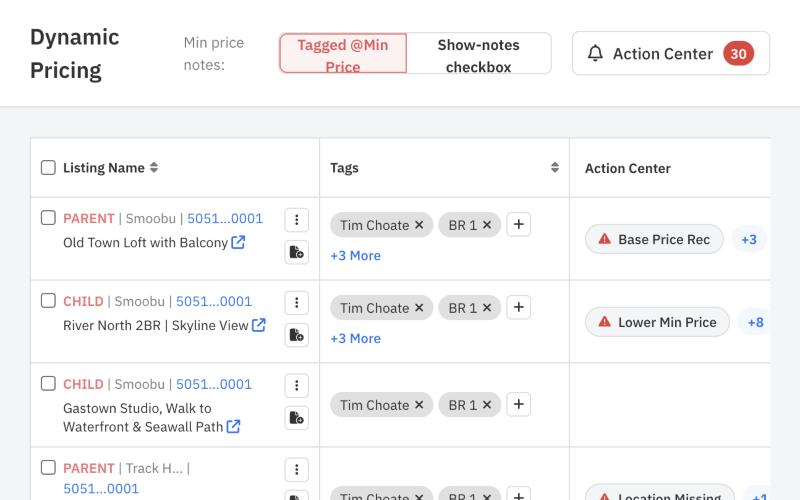
Alerts live in the listings table, next to the data they’re about.
On desktop, alerts live in a column of the listings table, so hosts see problems where they already manage listings. I built it as a working prototype to test alert states, chips and the resolve popover before engineering started.
04 · Key decisions
- In context, not a separate inboxAlerts appear as chips in the listings table and in the calendar header, next to the data they’re about.
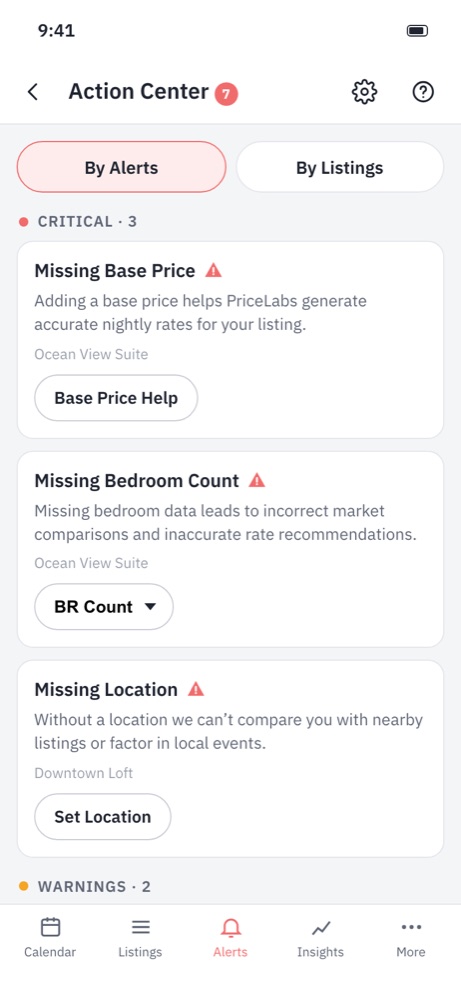
- One fix per alertEach card carries the action that resolves it: Base Price Help, a bedroom-count picker, set location.
- Severity sets the orderCritical alerts lead because they block pricing; recommendations come last.
- Hosts stay in controlA Manage Alerts sheet lets hosts switch off warnings and recommendations; critical alerts stay locked on.
05 · On mobile
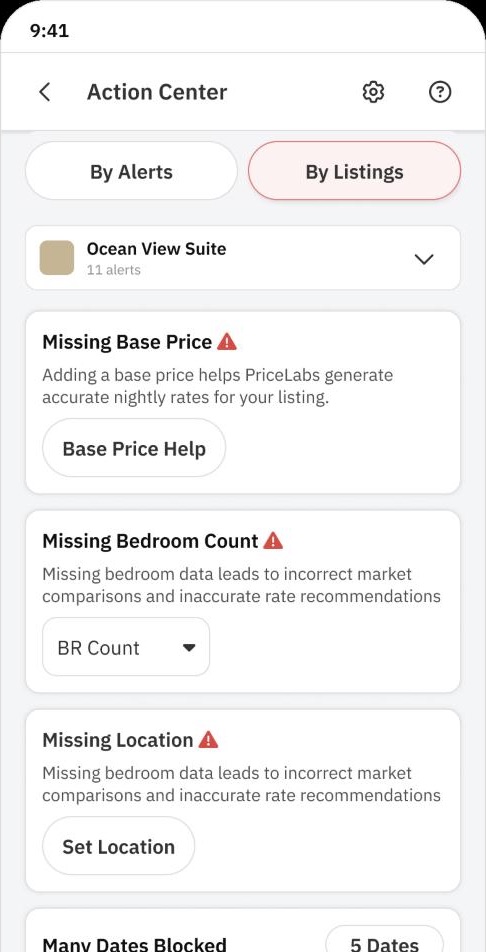
In the app, alerts group by listing or by type.
In the app, Action Center groups alerts by listing or by alert type, with a clear empty state once everything is resolved.
06 · Outcome
After launch
Shipping was the start. How the feature kept evolving from feedback, usage data and support.
-
Severity before volume
- What we heard
- Hosts with large portfolios saw dozens of alerts at once and didn’t know where to start.
- What we changed
- Grouped alerts into critical, warnings and recommendations, with critical ones always first and recommendations collapsed.
- Result
- Hosts act on the alerts that block pricing first.
-
Alerts where the data lives
- What we heard
- Most fixes happened from the listings table, rarely from a separate alerts page.
- What we changed
- Moved alerts into chips in the listings table and the calendar header, next to the data they’re about.
- Result
- Alerts get seen in the normal workflow instead of a page few people visit.
-
Hosts stay in control
- What we heard
- Hosts wanted to silence recommendations they disagreed with.
- What we changed
- Added a Manage Alerts sheet: warnings and recommendations can be switched off, critical alerts stay locked on.
- Result
- Less alert fatigue without hiding issues that break pricing.
- Bulk fixes across listings that share the same alert
- Action Center v2 with multi-calendar for compact screens
- AI actions suggested from performance experiments