Case study · Mobile · 0 → 1
Making a complex revenue tool simple enough for your pocket.
PriceLabs is powerful but known for being complex, and its mobile web was hard to use. We designed an app for hosts on the go: a three-step setup, a thumb-first pricing calendar and one-tap sync, built on a mobile layer of our existing design system.
Version 2 · a what-if study
What if the PriceLabs app had been built natively for iOS?
Version 1 shipped fast as a mobile layer on the PriceLabs web design system. This study takes the same workflows, screen for screen, and rebuilds them using only Apple's own components, following the Human Interface Guidelines strictly: no custom controls, no invented patterns. Where the shipped screen and HIG disagree, HIG wins, and I note the accessibility gain.
My three working prototypes from the project, next to the same flows rebuilt strictly from Apple’s components. Both sides are live: tap through them.
Onboarding
Welcome, then the three setup steps: base price, minimum price and minimum stay.
- A navigation stack with a progress view; Back is the system’s job, so the custom Back buttons go.
- “Why this price?” and “Set manually” open sheets over the step instead of new screens.
- Nights are steppers, rental type is a checkmark list, the minimum price is a text field + slider bound together.
Action Center
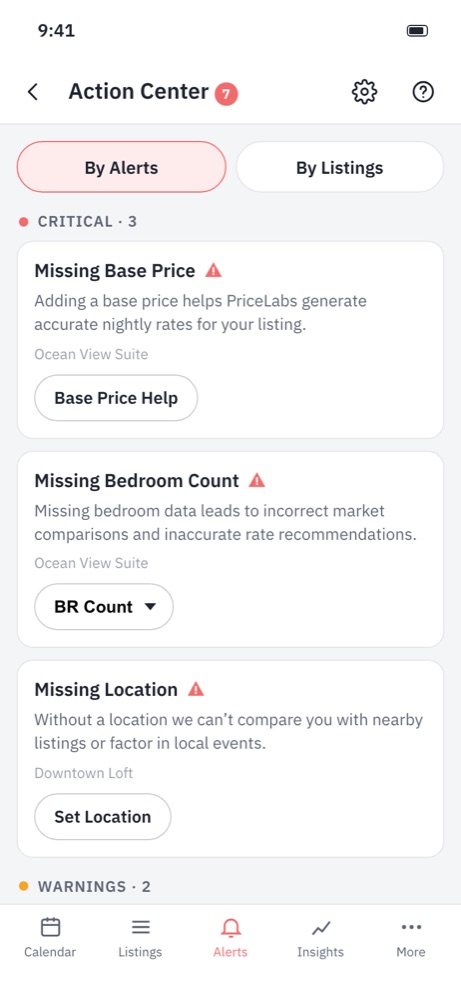
Alerts by severity or by listing, each with the one action that fixes it.
- Pill tabs become a segmented control; alerts are an inset grouped list with section counts.
- Fixes use stock controls: a menu for bedroom count, sheets for base price and location, swipe actions for quick ones.
- The tab bar badge counts down as you fix things.
Calendar + neighbourhood data
The pricing calendar with market data for each date.
- Tapping a date opens a sheet with a stepper override and the neighbourhood comparison, so the month stays in view.
- Price, demand and market are a segmented control; Sync Now is a toolbar action with live status.
- Each day reads its demand in words to VoiceOver, not just in colour.
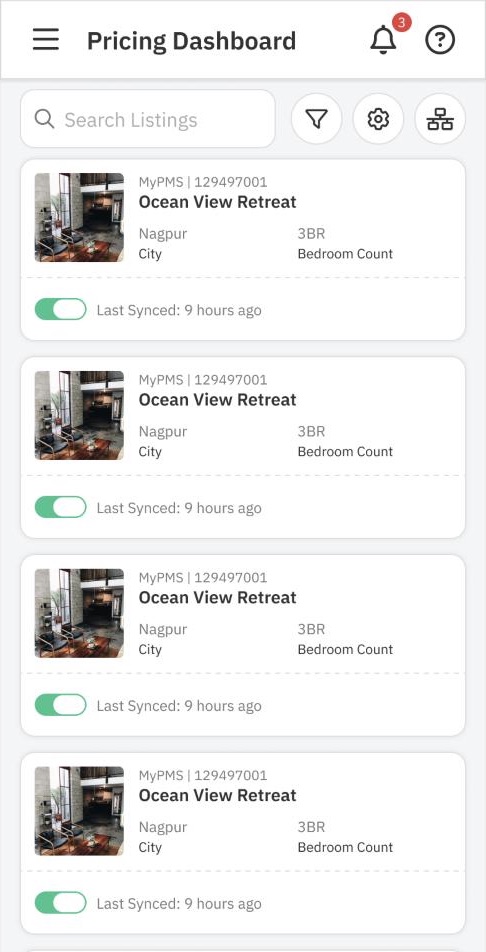
9:41
Listings
⌕ Search listings
312 listings · sorted by revenue
Ocean View RetreatNagpur · 3 BR · MyPMS 1294970019 h ago
Hillside CabinManali · 2 BR · MyPMS 1294970142 h ago
Old Town LoftGoa · 1 BR · MyPMS 129497022Paused
Lakeside VillaUdaipur · 4 BR · MyPMS 1294970311 h ago
Pricing Dashboard
- Navigation: a hamburger drawer becomes a tab bar (Listings, Calendar, Actions, More), Apple's pattern for 3–5 top-level sections; Action Center gets a badge instead of a bell.
- Search field sits under the large title and collapses on scroll, as in Mail and Settings.
- Cards become an inset grouped list: one row per listing, a standard toggle for sync, and the sync age as trailing secondary text.
- Accessibility: each row reads as one VoiceOver element ("Ocean View Retreat, Nagpur, 3 bedrooms, sync on, synced 9 hours ago"); grey 11 px captions grow with Dynamic Type.
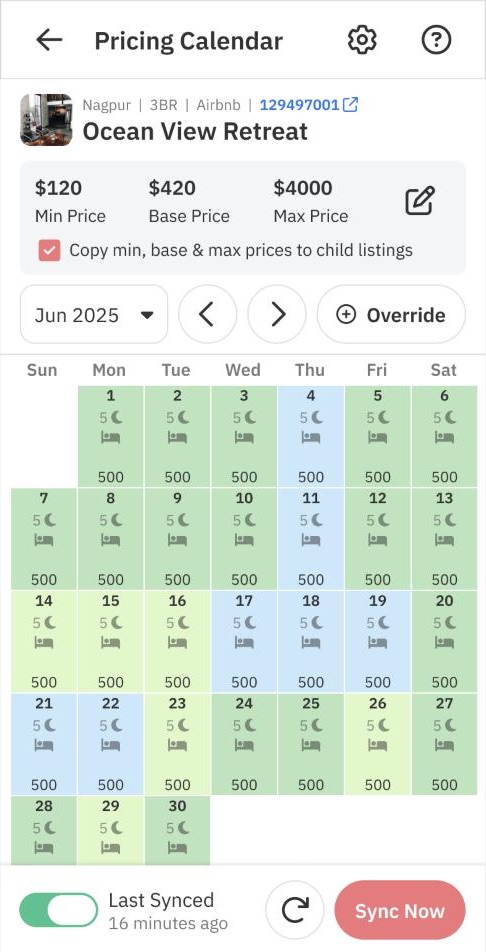
9:41
Min$120
Base$420
Max$4,000 ›
June 2025 ⌄‹ ›
SMTWTFS
150025003500450055006500
75008500950010500115001250013500
14500155001650017500185001950020500
Shading shows demand; each day also says it in words to VoiceOver.
Pricing Calendar
- Min, base and max price move into a grouped list with disclosure, instead of three numbers and a pencil icon.
- The month switcher is a compact date picker; Sync Now lives in the bottom toolbar with its status text, where iOS puts actions for the whole screen.
- Accessibility: demand is shown by colour and spoken ("June 17, $500, high demand, 5-night minimum, booked"). The legend icons were too small to tap; on iOS each day opens a sheet with everything in words.
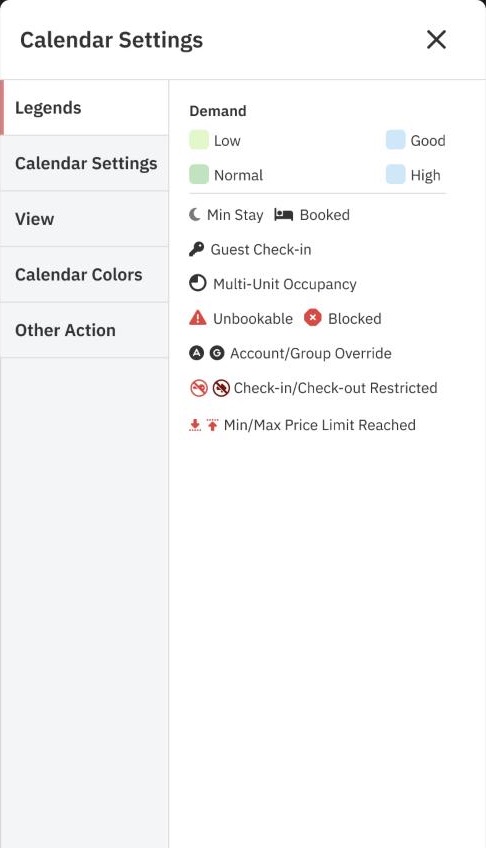
9:41
CalendarDone
Demand
Low
Normal
Good
High
Minimum stay
Bookings
Overrides
Calendar coloursDemand ›
Calendar settings
- A two-pane side menu inside a modal becomes one sheet with a Done button and grouped sections.
- The legend becomes real settings: toggles decide what shows on each day, so the legend explains only what is on screen.
- Accessibility: every swatch has a text label; the sheet supports the medium and large detents, so it can sit over the calendar.
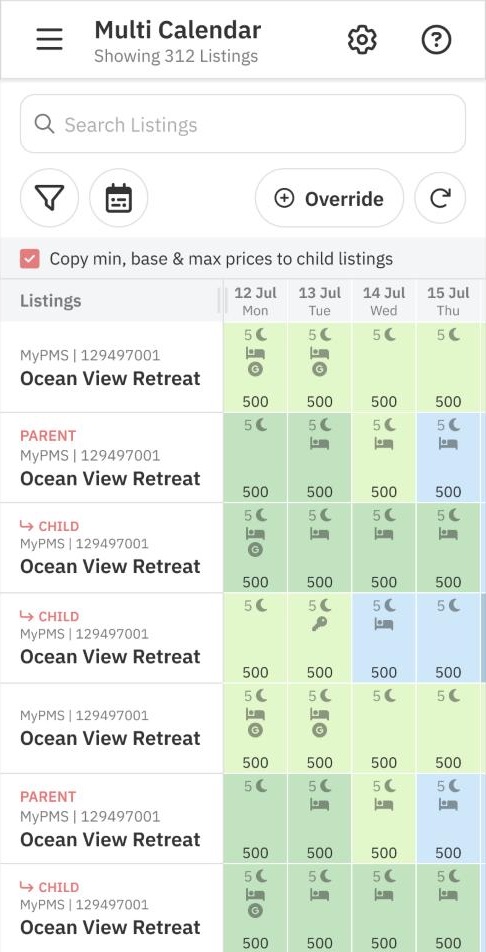
9:41
Calendar
All 312ParentsBooked
Sat 12Sun 13Mon 14
Ocean View RetreatParent · 2 child500500500
↳ Unit A500Booked500
↳ Unit B500500500
Hillside CabinSingle310310280
Multi Calendar
- Parent and child listings use an outline (disclosure) group, the native way to nest rows, instead of coloured PARENT/CHILD tags.
- A segmented control replaces the filter-first flow for the three views hosts use most.
- Accessibility: booked days say "Booked" instead of only an icon; the listing column stays pinned while dates scroll.
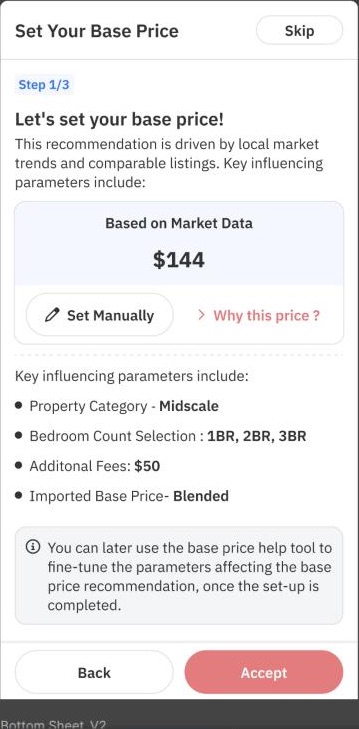
9:41
Step 1 of 3
Recommended from market data$144Why this price? ›
Based on
Property categoryMidscale
Bedrooms1–3 BR
Additional fees$50
Imported priceBlended
Setup · base price
- A navigation bar with Cancel and Skip, a progress view for the three steps, and one prominent button for the main action.
- "Back" goes away: in a navigation stack, back is the system's job (swipe or the back button).
- Accessibility: coral text and buttons on white (contrast about 2.6:1) fail WCAG for text; the system tint (4.5:1+) passes, and buttons scale with Dynamic Type.
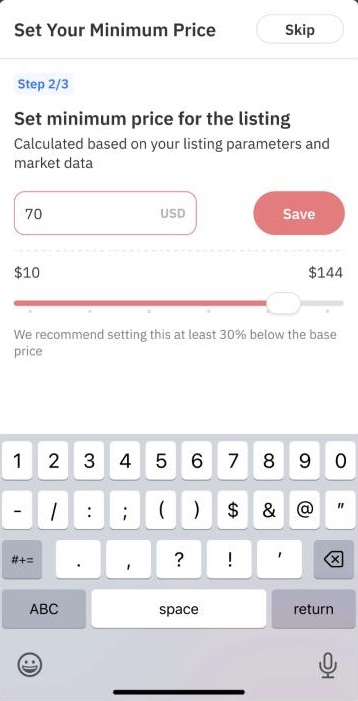
9:41
Step 2 of 3
Minimum price$70USD
$10$144
Setup · minimum price
- A text field in a form row with a decimal pad, and a standard slider bound to the same value.
- The inline coral Save button becomes the bottom Continue: one primary action per screen.
- Accessibility: the slider announces values ("70 dollars") and supports swipe up and down to adjust.
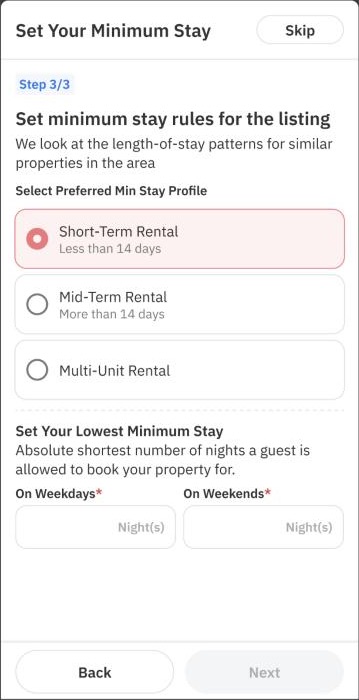
9:41
Step 3 of 3
Rental type
Short-termLess than 14 days✓
Mid-term14 days or more
Multi-unit
Weekdays−2+
Weekends−3+
Setup · minimum stay
- Big radio cards become a checkmark list, iOS's single-choice pattern.
- Two empty "Night(s)" fields become steppers: nights are small whole numbers, so typing is slower than tapping.
- Accessibility: the disabled grey Next button (an unclear dead end) is gone; Finish is always available with sensible defaults.
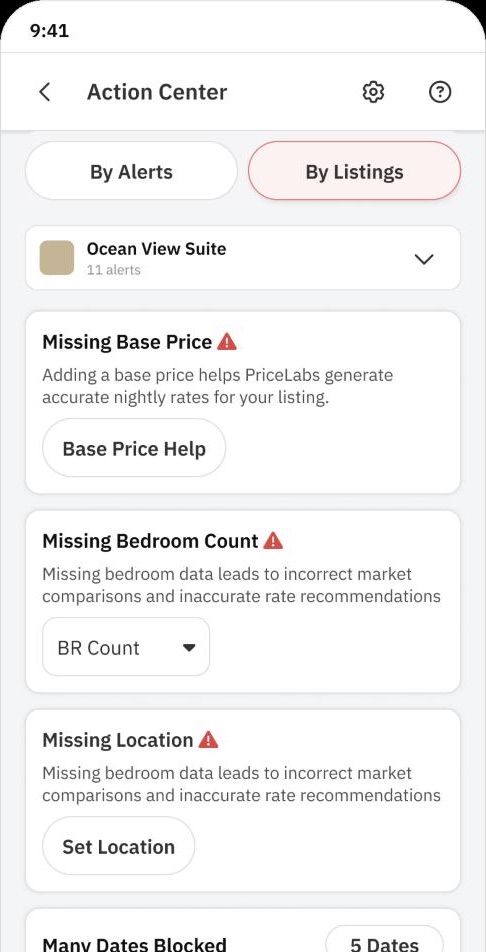
9:41
Actions
By AlertBy Listing
Ocean View Suite · 11 alerts
!Missing base pricePrices can't be generatedFix
!Missing bedroom countMarket comparisons are off2 BR ⌄
!Missing locationMarket data unavailableSet
▦Many dates blocked5 dates in the next 90›
Action Center
- Pill tabs become a segmented control; each alert is a list row with a bordered button or a menu (bedroom count) as its fix, and swipe actions for the quick ones.
- Severity uses system red and orange with an icon, never colour alone.
- Accessibility: each row exposes its fix as a VoiceOver custom action, so it can be fixed without hunting for the button.
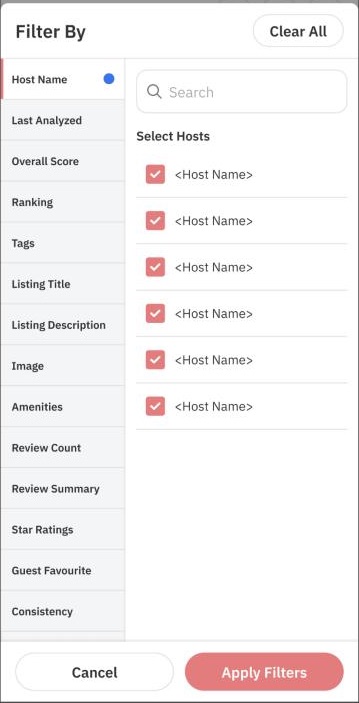
9:41
ResetFilterApply
HostAll 6 ›
Last analysedAny ›
Overall scoreAny ›
Tags2 ›
Missing photos
Guest favourite
Star rating4+ ›
Filters
- A two-column picker squeezed onto a phone becomes a sheet with a list of filters, each drilling into its own list with checkmarks; yes/no filters are toggles.
- Reset and Apply sit in the sheet's navigation bar, where iOS users look for them.
- Accessibility: the 10 px category labels in the left column were below the minimum text size; list rows use body text and grow with Dynamic Type.
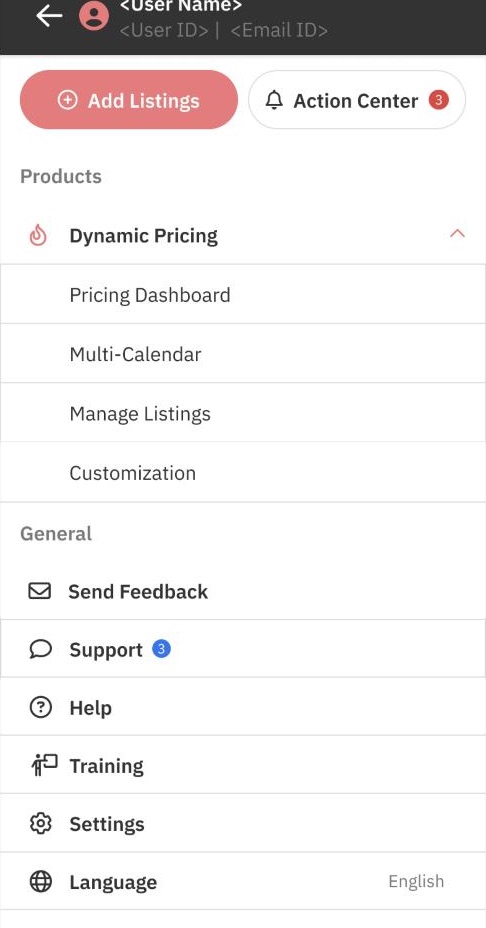
9:41
More
SCShail ChandelAccount, plan and billing›
+Add listings›
⌘Manage listings›
✎Customisation›
?Help and training›
✉Send feedback›
⚙︎Settings›
Navigation
- The drawer's top items become tabs; the rest goes into a More tab laid out like Settings: grouped rows with coloured icon tiles.
- Language moves out of the app into the iOS per-app language setting, as HIG recommends.
- Accessibility: no hidden drawer behind a gesture; every destination is one tap from a labelled tab.
Shipped screens: PriceLabs app, sample data. Rebuilt screens: HTML and CSS drawn to Apple's component specs. A design study, not a shipped product.
The design system
One library, followed strictly
The point of the exercise was discipline: pick one system and don't improvise. Every element on the rebuilt screens is a stock iOS component used the way Apple documents it. PriceLabs keeps its identity through the tint colour, the app icon and the content, not through custom controls.
- Navigation: tab bar for top-level sections, navigation stack for drill-down, sheets for focused edits. No drawers.
- Lists: inset grouped lists for settings-like content; plain lists for long, searchable content.
- Controls: toggles, steppers, sliders, segmented controls, pickers and menus. One prominent button per screen.
- Type: SF Pro text styles only (Large Title 34, Title 3 20, Body 17, Subheadline 15, Footnote 13, Caption 12), with Dynamic Type; tabular figures for prices.
- Colour: semantic system colours (label, secondaryLabel, separator, groupedBackground) so dark mode and Increase Contrast work for free.
PriceLabs web systemiOS (HIG) equivalent
Coral primary buttonProminent button in tint colour
Hamburger drawerTab bar + More
Card listInset grouped list
Pill tabsSegmented control
Radio cardsCheckmark list
Number inputStepper / text field + decimal pad
Modal with side menuSheet with detents
Toast / bannerInline footnote or alert
Icon-only buttonsSF Symbols with labels for VoiceOver
tint · action
systemGreen · up
systemRed · down
systemOrange · attention
groupedBackground
PL coral · brand only
Accessibility, before and after
Contrast
Coral #F37579 with white text is about 2.6:1, below the 4.5:1 WCAG AA needs for text. The system tint passes and adapts in dark mode.
Text size
Captions as small as 10–11 px in the shipped filters and calendar. HIG text styles start at 11 pt and scale with Dynamic Type up to accessibility sizes.
Touch targets
Calendar legend icons and small icon buttons were under 44 × 44 pt; every control in the rebuild meets it.
Colour alone
Demand was colour only. Each day now also states demand in words for VoiceOver, and the legend labels every swatch.
Screen readers
List rows are single VoiceOver elements with custom actions (fix, sync, override), so nothing needs precise tapping.
Motion
Sheets and pushes are system transitions, which respect Reduce Motion automatically.
A lead designer's playbook
How a native app gets built, end to end
My notes on what it would take to ship the PriceLabs app natively, and what I'd own as the lead designer at each step. Written as I learn, so I can run it next time.
NativeSwiftUI / UIKit on iOS, Jetpack Compose on Android
Best feel, performance and access to platform features (widgets, Live Activities, Face ID). Two codebases, two specialist teams.
Cross-platformReact Native, Flutter, Kotlin Multiplatform
One team, mostly shared code; native look depends on discipline. Good when speed and parity matter more than polish.
Web / PWAA mobile web app on the existing stack
Fastest to ship and reuses the web design system; weakest offline, notifications and store presence. Version 1's starting point was closest to this.
- Frame the jobs on the go. Which tasks happen on a phone (check prices, fix alerts, quick overrides) and which stay on desktop. Usage data decides scope. I own: the job list and the cut line.
- Pick the platform strategy with engineering: native, cross-platform or web, against team size, timeline and the features you need. I bring: which experiences need native APIs.
- Audit against the platform guidelines. Map every web pattern to its HIG and Material equivalent (the table in the previous tab). Decide where the brand shows. I own: the mapping and the exceptions list.
- Set up the design system for two platforms. Shared semantic tokens (colour roles, spacing, radii) exported to Swift and Kotlin; type mapped to SF Pro and Roboto text styles; icons as SF Symbols and Material Symbols. Use Apple's and Google's official Figma kits rather than drawing controls.
- Design the navigation model first: tabs, stacks, sheets, deep links, and what happens on a cold start from a notification.
- Prototype on real devices (Figma mirror, then TestFlight builds). Thumb reach, keyboard behaviour and one-handed use only show up on a phone.
- Design every state: empty, loading, offline, partial sync, error, permission denied. Native apps live with bad networks.
- Accessibility from the first screen: Dynamic Type layouts at the largest sizes, VoiceOver and TalkBack labels and order, 44 pt / 48 dp targets, contrast in light and dark mode.
- Handoff in platform terms: specs in points and dp, component names that match SwiftUI and Compose views, motion as system transitions or spring values, assets as vectors. Pair with engineers on the first screens.
- Permissions and notifications: ask at the moment of value (not on launch), explain why, and design the "Don't allow" path.
- Beta: TestFlight and Play internal testing with real hosts; track crash-free sessions, task success and feedback in one tracker.
- Store launch: App Store Review Guidelines and Play policies, screenshots and preview video, privacy labels, accessibility details, and a ratings prompt timed after a success moment.
- Release and learn: phased rollout, feature flags, analytics on the jobs from step 1, then iterate in small releases.
My checklist next time I lead one
- Agree the platform strategy before any high-fidelity design
- Official iOS and Android Figma kits in the library on day one
- Token export pipeline to Swift and Kotlin set up with engineering
- Navigation map and deep-link list signed off
- Every screen checked at the largest Dynamic Type size
- VoiceOver and TalkBack walk-throughs before beta
- Permission prompts designed with their "Don't allow" paths
- Store assets, privacy labels and review notes ready a week early
Outcome
11K+paying customers used the appin its first 90 days · from 15K+ installs
70%of them were small hoststhe segment v1 was designed for
2×more likely to switch to the appsmall hosts vs mid-size managers
5.0★Google Play rating4.5★ on the App Store
Part 1
Why mobile, and why it was hard
PriceLabs worked well at a desk. On a phone it was a squeezed copy of desktop, and the hosts who most needed it on the go were the ones it served worst.
01 · Problem
Hosts with 1–5 listings needed to check and fix prices on the go, but PriceLabs on a phone was a squeezed copy of desktop.
- The desktop-to-mobile trapMobile web views were direct copies of desktop screens: tiny touch targets, friction and cognitive overload.
- Fragmented onboardingSetup was scattered across modules. Copying it to mobile meant drop-off for new users.
- Data viz that didn’t scaleCharts and calendars built for a 27-inch monitor were unreadable and slow on a 6-inch screen.
- Not native, same backendBuilt in React on the web’s backend and IA, but it still had to feel like an app.
How might we give hosts confidence in their pricing from their phone, without bringing the complexity of the full product with it?
02 · Context
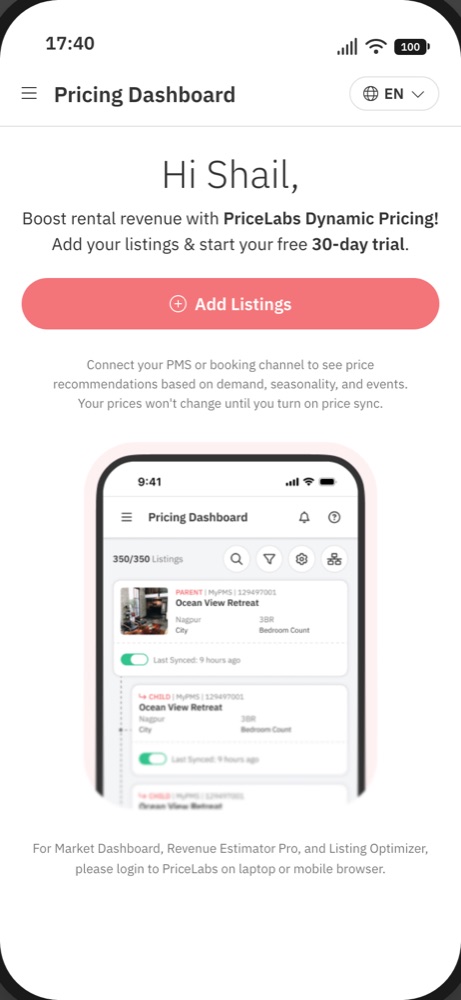
PriceLabs sets nightly prices for short-term rentals from demand, seasonality, events and market data. Until 2026 it was web-only, and the mobile web experience was hard to use: dense tables, small targets, desktop layouts squeezed onto a phone.
Revenue managers use the desktop suite for deep analysis, but a large segment, owners of 1–5 listings, needed a pocket assistant to monitor and sync prices without being tied to a desk.
A recurring piece of feedback was that PriceLabs feels more complex than competitors like Wheelhouse and Beyond. That complexity is also its strength for large property managers. The question was how to keep that depth on web while giving smaller hosts something they could understand at a glance.
03 · Goals & success metrics
Business
- Reach small hosts who found the product too complex
- Launch and test early in 2026
User
- Check and trust prices in seconds
- Make the common fixes without a laptop
We’d measure
- Onboarding completion
- Weekly active hosts on mobile
- Overrides created in the app
04 · Constraints
Time
- Design ran Nov–Jan while development started in December
Tech
- React on the shared backend, not native
- No separate component library
Business
- Billing excluded because of app-store commission on in-app payments
- Deep configuration stays on web
Part 2
Deciding what a phone is for
Before drawing screens, we had to decide what belongs on a phone at all, and how hosts would move through it.
05 · Deciding what belongs on a phone
Usage data showed hosts mostly view and monitor on mobile, so v1 targets small hosts doing on-the-go tasks.
We started from usage data, not the menu: the most-used features and screens, sorted by customer size and by on-the-go versus deep revenue-management work.
Where mobile web was already being used
Before the app, I looked at which desktop pages people were already opening on their phones, how many accounts did so, and how much time they spent there.
| Page | Share of visits on mobile | Accounts using it on mobile | Share of time on mobile | Decision |
|---|---|---|---|---|
| Base Price Help | 31.1% | 17.7% | In v1 | |
| Pricing Dashboard | 38.3% | 10.2% | In v1 | |
| Market Dashboard landing | 18.3% | 6.2% | Stays on web | |
| Revenue Estimator | 20.3% | 7.4% | Stays on web | |
| Revenue Estimator Pro landing | 20.3% | 7.4% | Stays on web | |
| Hotel data tab | 14.3% | 8.3% | Stays on web | |
| Portfolio Analytics · KPI | 25.8% | 7.1% | Stays on web | |
| Portfolio Analytics · Pacing | 27.5% | 5.5% | Stays on web | |
| Market Dashboards | 20.3% | 4.3% | Stays on web | |
| Neighbourhood data | 17.2% | 4.7% | Next | |
| Customizations | 9.1% | 2.0% | In v1 | |
| Revenue Estimator Pro dashboard | 13.5% | 3.7% | Stays on web | |
| Multi-calendar | 14.7% | 1.8% | In v1 | |
| Manage Listings | 3.8% | — | In v1 |
- Quick checks ledBase Price Help and the Pricing Dashboard had the highest share of mobile visits, and 38% of accounts opened the dashboard on a phone. They became the core of v1.
- Analytics were glanced at, not worked inA quarter of accounts opened Portfolio Analytics on mobile, but only 5–7% of the time spent there was on a phone. Those pages stayed on web.
- Low use can mean broken, not unwantedMulti-calendar and Customizations barely registered on mobile web (2% of time or less), even though hosts rely on them daily on desktop. We read that as the squeezed layout failing them, so both were rebuilt for touch, with customizations view-only in v1.
Customer size
Large · on the go
Quick checks across many listings
Large · deep RM
Customizations, analytics → web
Small · on the go
View, monitor, quick fixes → app focus
Small · deep RM
Rare; better guided on web
On the go ← task type → deep revenue management
Key insight
On a phone, people mostly view and monitor and act much less.
So the app leads with glanceable information and a few high-value actions, and leaves deep revenue management to web.
In v1
- Pricing dashboard & calendar
- Multi-calendar
- Date-specific overrides
- Base price help
- View customizations
- Onboarding & importing listings
Next
- Scrolling calendar
- Edit customizations
- Neighbourhood data & competitor calendar
- Action Center on mobile, with bulk actions
- RM AI agent
Out
- Billing (app-store commission)
- Deep configuration & analytics
06 · Information architecture & key journeys
One drawer for products, one tab bar inside each listing, and five journeys that the whole app is built around.
With the scope set, I mapped the app’s structure to the jobs hosts come to do, not to the web menu. The tree mirrors web so nothing has to be relearned; the journeys decide what sits one tap away.
Working board · app structure and key journeys
PriceLabs app
Onboarding
Sign up · Log in
Add listings (PMS / channel)
Getting started · 3 or 5 steps
Personalisation
Set-up complete
Pricing Dashboard
Search · filters · sync status
Listing
Calendar
Override (DSO)
Min / base / max edit
Calendar settings
Sync now
Customization (view)
Listing details
More
Multi-Calendar
Override across listings
Copy prices to child listings
Manage Listings
Mapping · Unmap
Action Center
Alerts by listing / type
Manage alerts
General
Settings · Language
Support · Help · Training
Feedback
Drawer itemListingBottom tabAction
1 · First-time setup
Sign up→Add listings→Base → min → stay→Review→Sync
2 · Daily check
Dashboard→Listing calendar→Sync status→Sync now
3 · Adjust specific dates
Calendar→Select dates→Override sheet→Save & sync
4 · Manage the portfolio
Multi-calendar→Select listings→Override / copy to child
5 · Fix an issue
Action Center→Alert→One-tap fix
Part 3
Designing the host’s day
Design starts here. With scope and structure set, we designed in the order a host meets the app: the system it’s built on, setting up, then the daily loop.
07 · A mobile layer on the design system
Mobile variants on existing components, not a new library: 48px controls, AA/AAA contrast, 22 components.
Instead of a separate library, we added mobile variants to existing components: one system, one set of tokens, less drift for engineering.
48px buttons & inputs32px chips & compact buttonsAAA primary text & actionsAA chips & calendar22 mobile components
| Token | Value | Used for |
|---|---|---|
--pl-m-control-height-lg | 48px | Buttons, inputs, selects |
--pl-m-control-height-sm | 32px | Chips, compact buttons |
--pl-color-action-primary | #F06C6C | Primary actions (Sync now, Accept) |
--pl-color-text-primary | #1F2430 | Body and headings, AAA contrast |
--pl-m-space-400 | 16px | Screen padding, card gaps |
--pl-m-radius-md | 8px | Cards, inputs, bottom sheets |
08 · Onboarding: a one-way street to the first sync
Seven screens from connecting a listing to the first sync.
Desktop setup was scattered across modules. On mobile we cut it to a linear path that ends in one moment: prices reviewed and sync turned on.
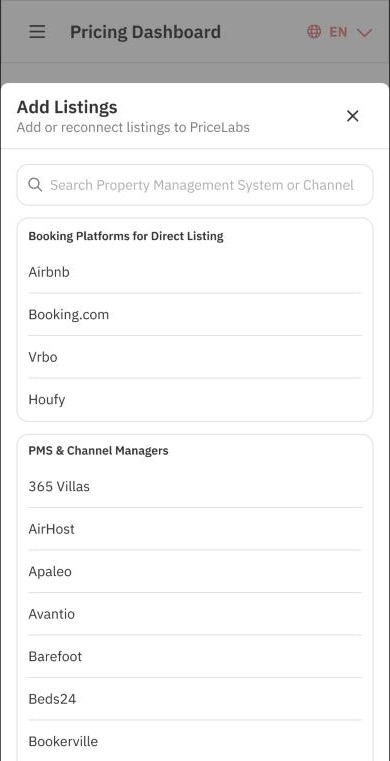
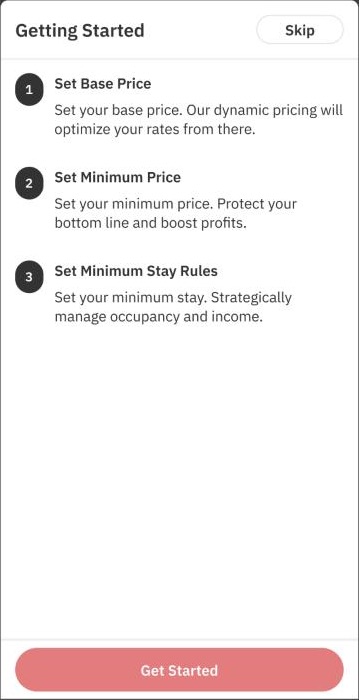
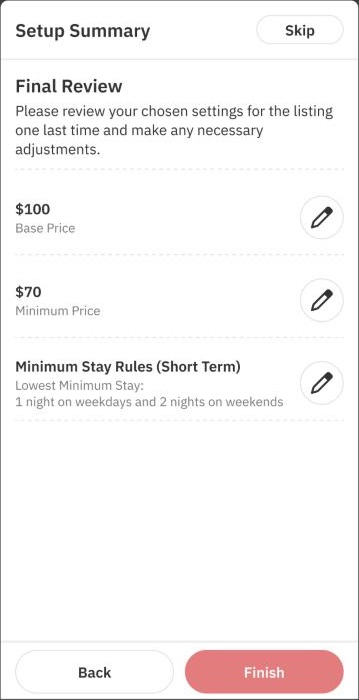
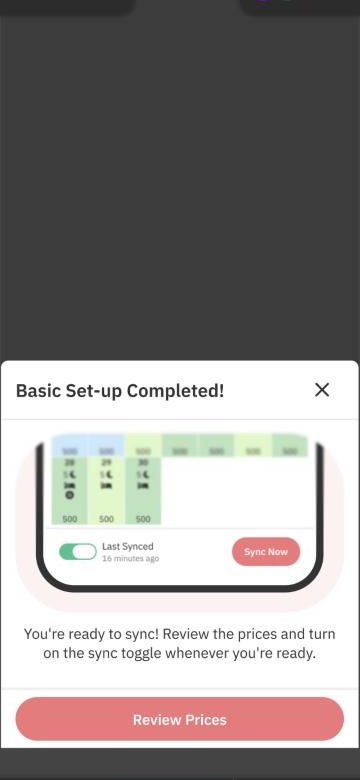
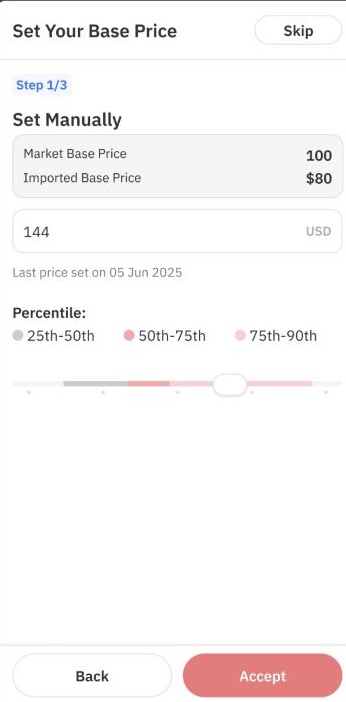
- Recommend first, edit secondEvery step opens with a value we calculated; manual entry is one tap away, not the default.
- Guardrails, not rulesMin price is bounded by base price, and the guidance (40–50% below base) only appears when it’s relevant, so new hosts can’t price themselves into a loss without being nagged.
- Sync stays off until reviewedPrices never push to Airbnb by surprise; the last screen hands control back to the host.
Try it
09 · Onboarding that adapts
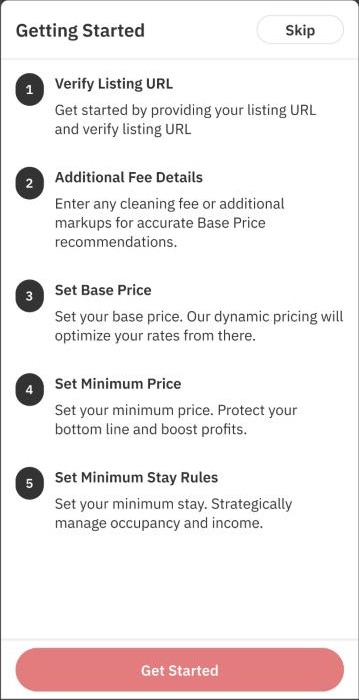
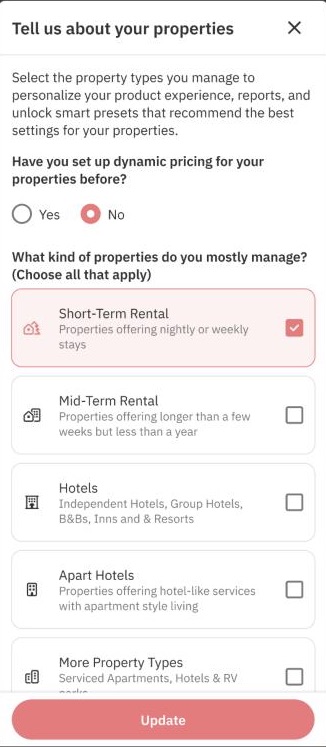
Not every listing arrives with the same data, so the path changes length instead of failing later.
10 · The daily loop: check, adjust, sync
The calendar carries the essentials, with sync in the thumb zone.
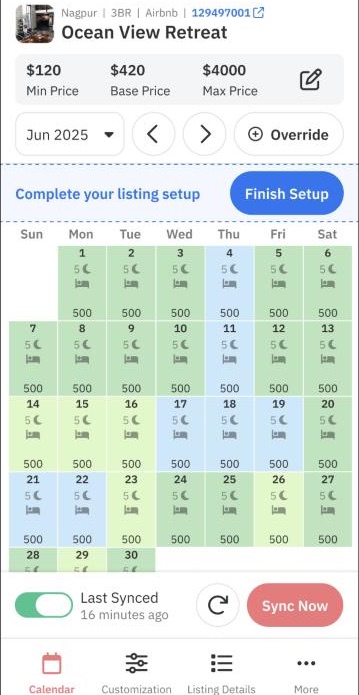
The calendar is where hosts spend their time, so it carries the essentials and nothing else. Navigation mirrors web: a drawer for products, and a bottom tab bar inside each listing.
11 · Key decision: creating an override
Creating a date-specific override (a manual price or minimum-stay change for chosen dates) was the most important action in the app. On web the calendar is built for scanning; on mobile we redesigned the calendar interaction around selecting dates and creating an override.
The override sheet carries the full model (a date range, copy to child listings, specific days of the week, final / min / max / base price with a fixed or percentage type, and stay restrictions), so we designed for two cases: the 80% case, a quick price change for a few dates, and the 20% case, where hosts need the advanced settings.
Part 4
Shipping it
Design and development ran in parallel, so how we worked mattered as much as what we drew.
12 · Validation & iterations
We iterated most on the calendar price cards, navigation, tooltips and Base Price Help, reviewing each round with our design manager and engineering before handoff.
After the first release the loop widened to real users: support tickets, customer calls, session recordings and usage data. What we heard and what we changed is in the after-launch timeline below.
13 · Methodology: how we listened and measured
One loop for feedback, one definition per metric, and the evidence behind both.
Feedback reached us from many places, and numbers can be read many ways. This is how we kept both honest.
The feedback loop
- CollectSupport tickets, customer calls, session recordings, in-app polls and usage data
- TrackOne shared tracker: who raised it and which part of the app it concerns
- DecideBug, new feature, a discovery problem, or a deliberate no
- Hand offI turn each decision into numbered, buildable changes for engineering
- Close the loopDesign QA, ship, and tell the customer
What we heard and what we decided
| Source | What we heard | Decision | Status |
|---|---|---|---|
| Ticket | Header and footer take a third of the screen | Slimmer header and footer | Shipped |
| Call | 15,000-listing manager sees too few rows in multi-calendar | Denser multi-calendar | Shipped |
| Call | Nobody found the long-press price breakdown | A hint that stays, or let hosts choose what a tap opens | Exploring |
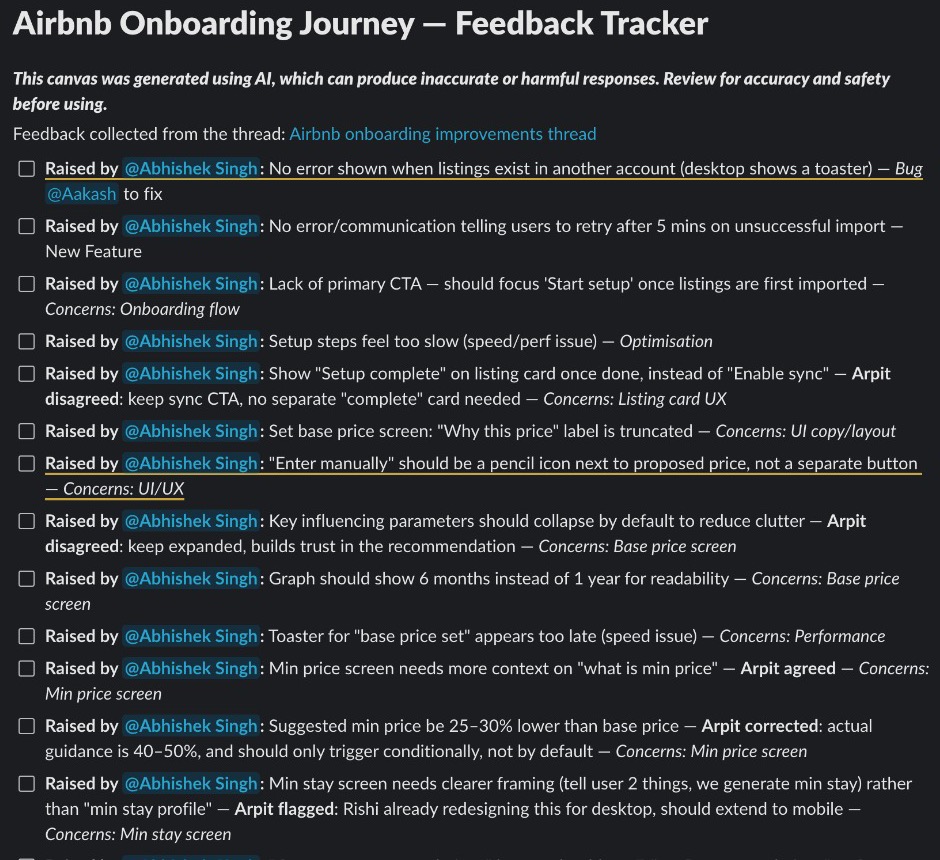
| Tracker | No clear next step after importing listings | Lead with “Start setup” | Shipped |
| Tracker | Show “Setup complete” on the listing card | Keep the sync call to action instead | Not doing |
| Tracker | Suggest a min price 25–30% below base | Corrected to 40–50%, shown only when relevant | Shipped |
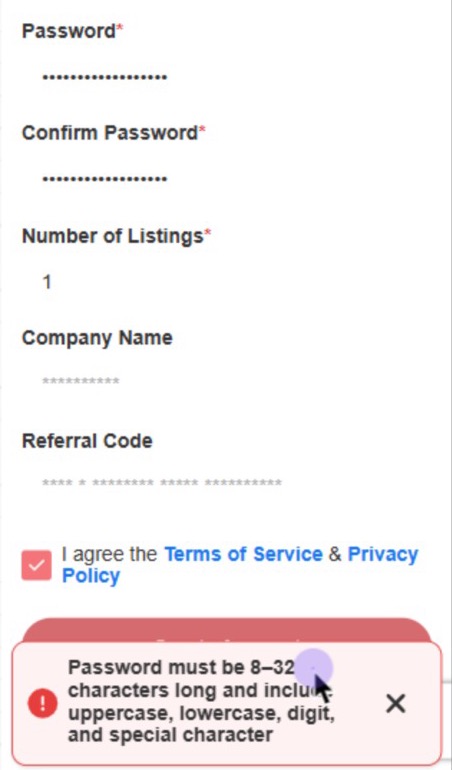
| Recording | Password rules appear only after a failed sign-up | State rules up front, validate inline | Proposed |
| Ticket | “I can’t delete an override in the app” | A wrong button state hid the delete action | Fixed |
| Feedback | No KPIs or price curves on mobile | Kept on web for v1, by scope | Not in v1 |
How we measured adoption
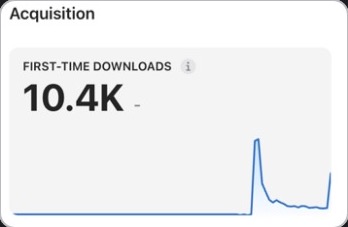
Installs · 15K+First-time store downloads: 10.4K from App Store Connect, 5K+ from Google Play. Includes people who aren’t customers yet.
Paying customers · 11,083Existing PriceLabs subscribers who used the app at least once in its first 90 days, split by business size.
Regular users · 3,418Used the app on 10 or more separate days between 12 May and 31 August, about 1 in 5 app users.
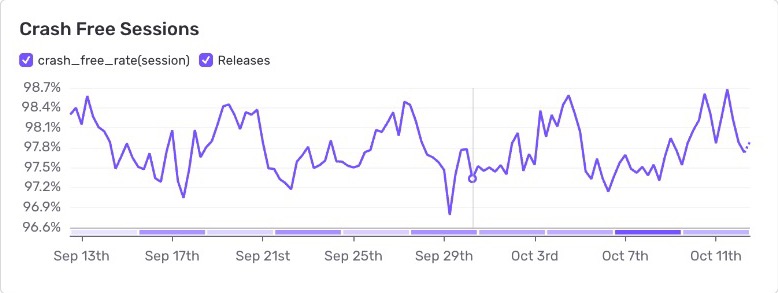
Quality · ~98%Crash-free sessions over 30 days of releases, from crash reporting.
- For each regular user, find the day they started using the app.
- Compare their daily average of pricing-dashboard views before and after that day, on desktop and on the phone browser separately.
- Count a change only if it moved more than 10% either way; anything smaller is “about the same”.
- Call someone “mostly in the app” if they viewed more pricing in the app than in a browser after starting, and set aside users with no browser history so a missing comparison isn’t mistaken for preference.
- Group by business size: small hosts (1–5 listings), mid-size (6–50) and large managers (50+).
This shows a correlation with when people started using the app, not proof that the app caused the change. 14 users with no browsing history were left out.
14 · How we worked
Design was split between me and Kaustubh, with our design manager Divesh guiding direction and reviews, and three developers plus a front-end lead.
Nov 2025Design starts: DS mobile layer, scoping
Dec 2025Development starts in parallel
Jan 2026Designs complete, handoff
Apr 2026v1 on the Play Store
Jul 2026iOS release + public launch
Because development started before designs were final, we designed in build order: foundations and components first, then the calendar and overrides, then onboarding, so engineers were never blocked.
15 · Launch & outcome
We set out to reach small hosts and replace the phone browser for quick fixes. Both happened.
The first version reached the Play Store in April 2026; iOS and the public launch followed in July 2026, in 7 languages. Here is how it measured up against what we set out to do.
| What we set out to do | What happened | |
|---|---|---|
| Reach small hosts who found PriceLabs too complex | 7,726 of 11,083 paying customers on the app are small hosts (70%), and they’re the most likely to make it their main way to check prices: 27.5%, vs 13–17% for larger managers. | Met |
| Common fixes without a laptop | Among regular app users, phone-browser use fell for 48% of small hosts and 59% of mid-size managers, while desktop use stayed roughly even, as intended. | Met |
| Launch early in 2026 | Android in April, iOS in July, in 7 languages. 15K+ installs, 10.4K of them on iOS in under four weeks. | Met |
| An app people trust | 5.0★ on Google Play and 4.5★ on the App Store, with about 98% crash-free sessions. | Met |
| The metrics we set: onboarding completion, weekly active hosts, overrides in the app | Early signals are strong: setup drop-off fell with the 4- and 6-step paths, and overrides are now made on the go instead of waiting for a laptop. | Early signal |
How each number was calculated is in the methodology section above.
Did it change how people work?
We compared how 3,400+ regular app users browsed PriceLabs before and after they started using the app.
Deep work stayed on desktop, which is what we designed for.
Small hosts 70%Mid 26%
A quarter are mid-size managers, more than v1 was scoped for. That’s why multi-calendar density became the top request.
What users said
“The most important things you’re going to want to change from a phone are there.”App Store review ★★★★★
Companies “either get web right or app right and rarely both.” This one, for a first version, “has done very well”.Google Play review ★★★★★
“The app came in handy a few times in the past weeks when I was on the road.”Property manager, by email
“Le meilleur du pricing dans ma poche.” The best of pricing, in my pocket.App Store review, France ★★★★★
Store ratings are counted across countries as of October 2026. The two 1-star App Store reviews were about how long an app took to arrive and a billing dispute, not the app itself.
Part 5
What comes next
Launch was the start. The roadmap and the first post-launch fixes show where the app goes from here.
16 · Next on the roadmap
From a scrolling calendar to AI actions: what the app takes on next.
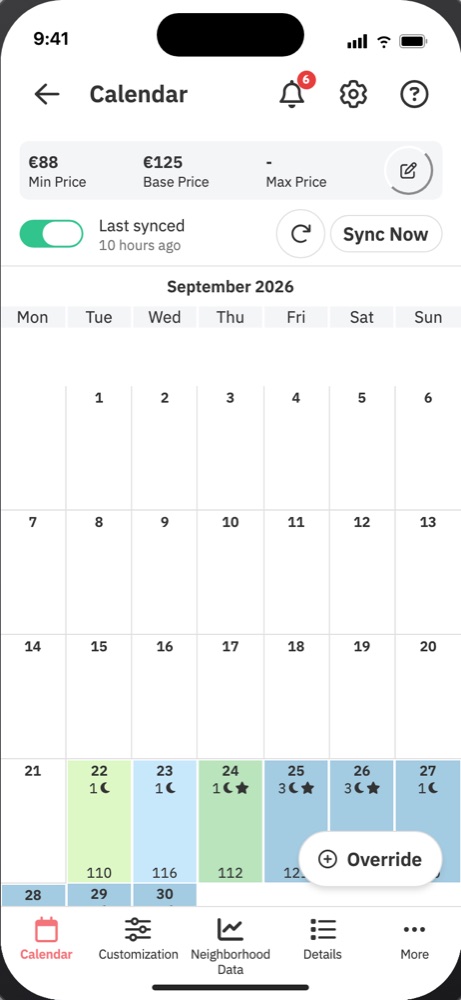
Calendar & settingsScrolling calendarEdit customizationsAdding cards on mobile
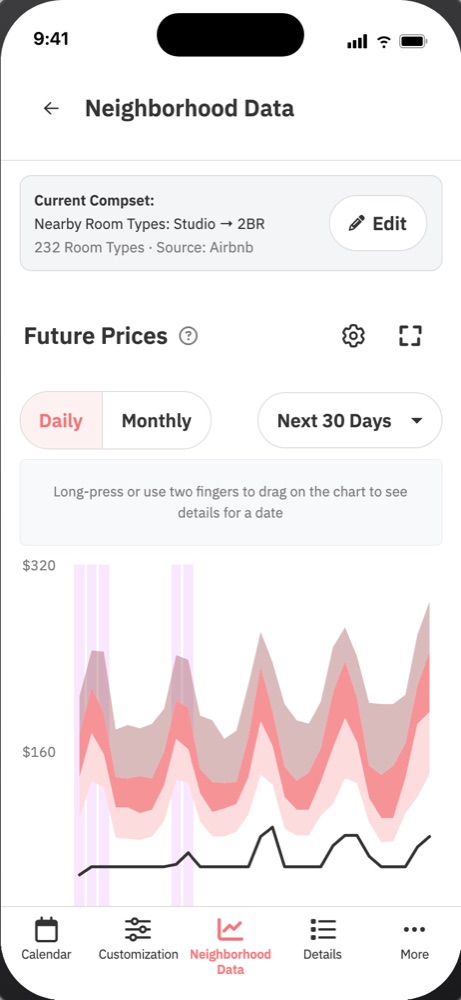
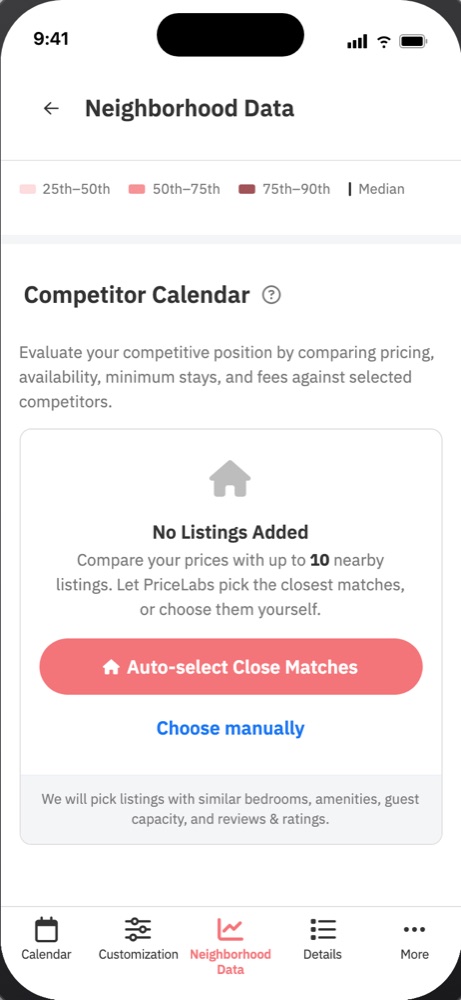
Market dataNeighbourhood dataCompetitor calendar
Action CenterAction Center on mobileBulk actionsv2 with multi-calendar for compact screens
AIRM AI agentAI actions from performance experiments
Four of these are already prototyped in the real app shell. Tap a phone to try it.
After launch
Every change after launch traces back to something we heard or measured.
Shipping was the start. Every change after launch traces back to something we heard or measured: a customer call, a support ticket, a session recording or the usage data.
-
May 2026
Watching real sessions from day one
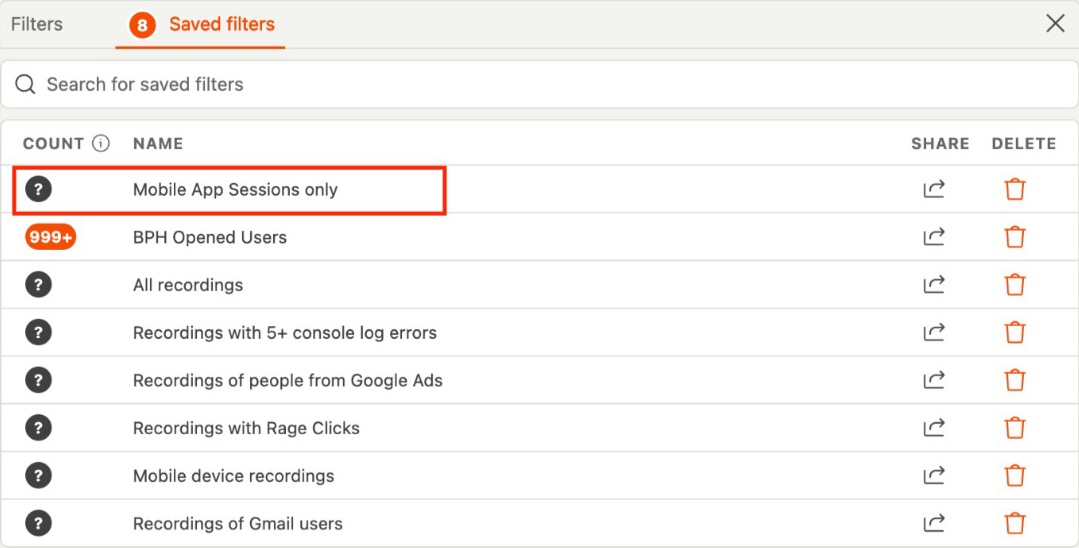
While the app was with beta users on Android, I asked for a way to watch real app sessions, and we set up a saved filter for app traffic in our session recorder. From then on we could see where people hesitated, not just read tickets about it.
-
Jun 2026
Large portfolios on small phones
A property manager with 15,000+ listings couldn’t see enough rows in multi-calendar on a small iPhone, and hosts didn’t know they could long-press a price to see how it was calculated: the 2-second hint on load went unnoticed. Similar listing names were cut off exactly where they differ.
Changed: a much more compact multi-calendar before the iOS release and full listing names where it matters. Next, we’re exploring better tooltip discovery: a hint that stays until dismissed, and letting hosts choose whether a tap opens the price breakdown or an override.
A 657-listing customer on the same round of calls said he loves the simplicity and wouldn’t want the app to get too complicated. We kept that line.
Multi-calendar after compacting -
Jul 2026
iOS launch: 10.4K downloads in under four weeks
The iOS app went live on 6 July. The first spike is the launch; the second came from the monthly newsletter. A first fix (v1.0.1) followed for phones with on-screen navigation buttons, where the bottom bar overlapped the layout.
-
Jul 2026
“Compact or spaced out?”
A property manager liked the app but wanted to see more listings at once and asked for a compact view toggle.
Proposed: rather than a fixed toggle, a map-style zoom (+ / −) for density. We first asked the customer which screen they meant before committing.
The listing view they wanted denser -
Aug 2026
Bigger than we scoped for
11,083 paying customers used the app in the 90 days to 13 August. We designed v1 for small hosts; a quarter of the audience runs much larger portfolios, which moved multi-calendar density up the list.
7,726 small hosts2,902 midSmall hostsMid-marketLarge PMs · 455 -
Aug 2026
Sign-up errors that came too late
A recording showed a new user trying to set a password two or three times. The rules only appeared as an error after they submitted.
Proposed: state the rules before the password is entered and validate inline as people type.
-
Sep 2026
Onboarding that knows what’s missing
An internal walkthrough of the Airbnb onboarding journey produced a tracker of issues: no clear primary action after import, recommendations weaker when the Airbnb URL or fees were missing, and the final “review, then sync” moment easy to miss.
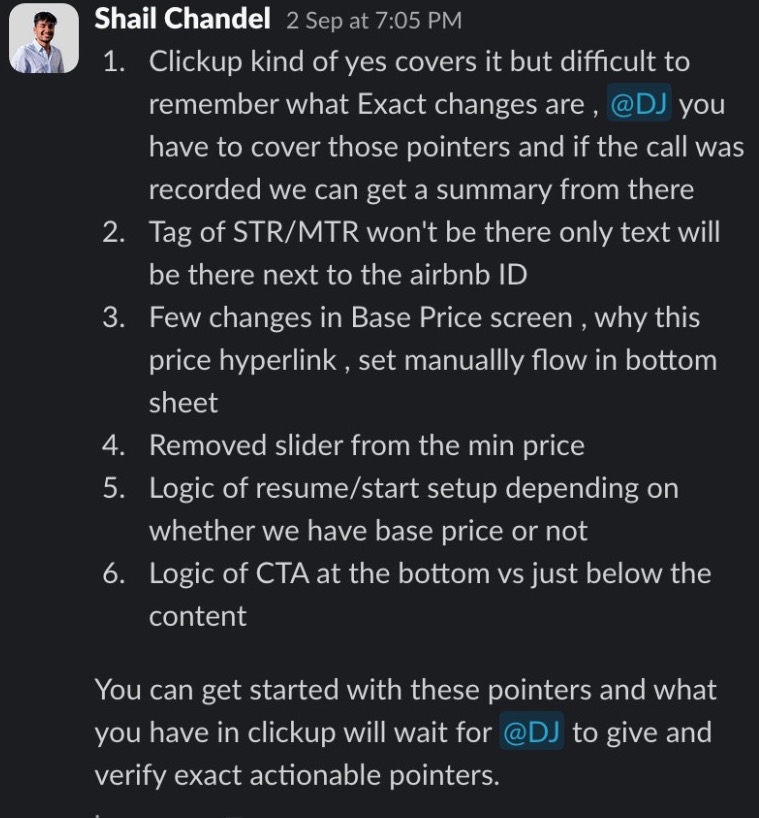
Changed: two paths. 4 steps when we have the data, 6 when we don’t (identify the listing on Airbnb and add fees first). Review & sync became an explicit last step, the min-price slider was removed, “Why this price?” sits next to the number, and a “Complete your listing setup” banner resumes setup from the calendar.
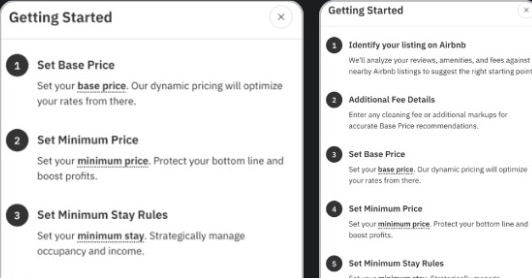
Same screen, two lengths, decided by the data we already have. -
Sep 2026
Give the calendar the screen
A host circled the header and footer: they “take up about 1/3 or more of the entire phone screen”, while the calendar is what they actually look at.
Changed: a slimmer header and footer, already in the next build when the ticket came in.
The calendar the host wanted more room for -
Sep 2026
One clear “Add payment method” button
Billing stays out of the app because of app-store commission, so it lives on mobile web. There, only 16.1% of synced users went on to add a payment method, against 50.4% on desktop. The options were small, unlabelled icon buttons.
Changed: one full-width button whose label adapts: “Add Credit Card” when that’s the only option, “Add Payment Method” with a short list when there are several.
Mobile webDesktopJul 24–Aug 1Aug 21–29Sep 18–26 (after)Result: page-to-card-on-file conversion on mobile web rose by about 11 points while desktop, as a baseline, stayed flat. Compared across three 9-day windows, not an A/B test.
-
Sep–Oct 2026
Stable as usage grew
Crash-free sessions held between about 97% and 98.7% over 30 days of releases, so design changes could keep shipping without trading off stability.
The deck
The case study as a presentation, for a design review or an interview panel. Use the arrows or your keyboard.